
MxLoader 6.2 was the last version with a built-in support for failure codes data loading. Unfortunately this version does not support REST APIs. This post describes how to load failure codes using MxLoader 8.5 with the latest versions of Maximo (including MAS Manage) that only support REST protocol.
I will use the following small failure class hierarchy C1 as an example.
- CL1 – Failure Class 1
- P1 – Problem 1
- C1 – Cause 1
- R1 – Remedy 1
- C1 – Cause 1
- P2 – Problem 2
- C2 – Cause 2
- R2 – Remedy 2
- R3 – Remedy 3
- C2 – Cause 2
- P1 – Problem 1
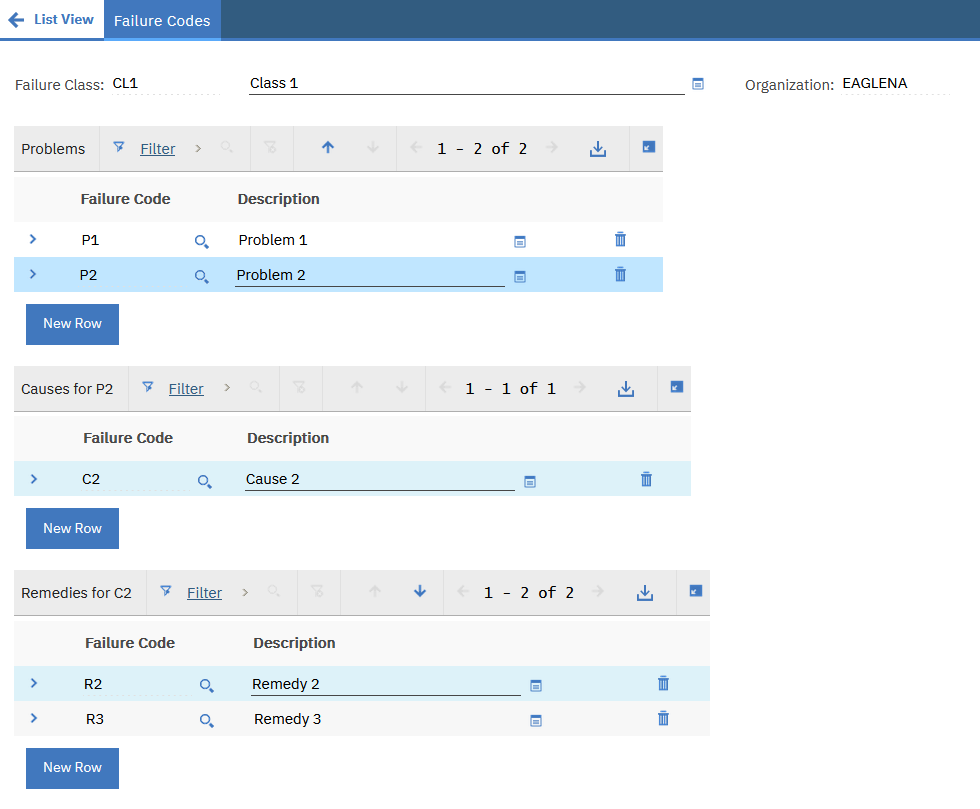
This is how it looks in Maximo.
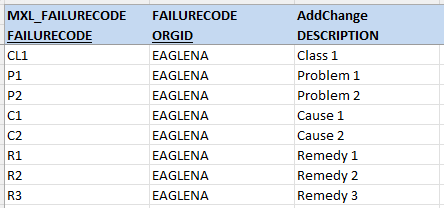
The first step is to load the descriptions of the class, problems, causes. This can be achieved using the MXL_FAILURECODE object structure.
Now we have to load the failure hierarchy. The standard MXAPIFAILURELIST object structure has a non-persistent attribute PARENTCODE on the FAILURELIST object that can be used for this purpose.
Here is the sequence of loading sheets to load the hierarchy.




You can download the sample MxLoader file from here.
There is only one small draw back I have found. If you launch the same sheet many times you will get duplicates in the failure hierarchy. This is caused by the fact that there is no built-in unique index on the FAILURELIST object. However, if something goes wrong, you can simply delete the entire failure class and start from the beginning.
Hi Bruno, thank you very much for spending the time to go through this and post this walk-through.
This has been a particular issue for many of us for such a long time now, that this is most helpful indeed and so much appreciated!
We’ll have a go and see how we get on! 🤗
Bruno,
I downloaded your load sheet and updated it with my data. Loaded FC first, no issues. Loaded Failures next, no issues. Trying to load Problems, getting BMXAA1166E – Hierarchy already exists.
Can you help?
Bruno – I can load 1 failure, class, problem, cause, rememdy at a time. I am trying to load in bulk. That is when I get the error.
Hi Bruno,
Thank you for the solution of Failure hierarchy data upload.
In our case we have one extra hierarchy type xxxxtype after the failure class upload. I tried to add one more sheet with the extra type adding, but the data load is not working properly. It is uploading the Failure Class and the new hierarchy xxxxtype data. After that the PROBLEM, CAUSE and REMEDY are not loading correctly, it is adding to some other parent codes.
Please assist on this one.
Hi Mr. Bruno,
Request to please check my last update and assist on the issue.
Thank you.