
The most common technique to force a reload of an MboSet (and thus refresh a table on the UI) is to call the MboSet().reset() method.
context = UIContext.getCurrentContext()
wcs = context.getWebClientSession()
wcs.getDataBean(“assetmove_t”).refreshTable()
In some cases you don’t need to reload the MboSet or you just cannot do it because you haven’t yet saved the MboSet. In such cases you have to work at UI level using the DataBean.refreshTable() method. This will force a reload of the data in the UI from the underlying MboSet in memory.
First of all you have to identify the databean name. This can be done in the table definition of the application. For example the databean name of the Plans-Labor table in the WOTRACK application is “plans_plans_labor_labor_table”.
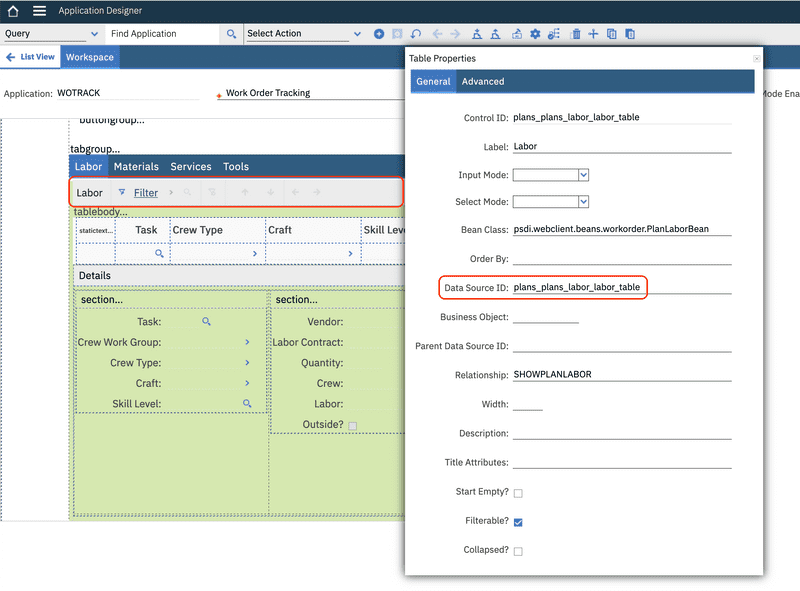
If the Data Source ID is not defined you can use the Control ID as the databean name.
Now you can use the UIContext.getWebClientSession() method to get a reference to the WebClientSession and then the WebClientSession.getDataBean(beanId) to get the DataBean object. Now the DataBean.refreshTable() method will force the reload of the table in the UI.
from psdi.common.context import UIContext
...
wcs = UIContext.getCurrentContext().getWebClientSession()
wcs.getDataBean("plans_plans_labor_labor_table").refreshTable()
For a deeper explanation refer to the Refresh Table Data post on Sharptree blog.
Hi Bruno,
I’m trying to implement this, but have not been able to get the databean.refreshTable() to work. See my post here on the IBM Maximo Community:
https://community.ibm.com/community/user/discussion/refresh-the-ui-to-show-updates#bmc88db059-3fe5-4df2-a598-019d449ef13f
Can you offer any insight into getting this to work?