
Maximo allows to create predefined queries in applications that can be used to filter records based on specific criteria and reuse them in Start Centers. However, there are some limitations in the capability and manageability of these queries. In this post I will describe how to create a Query Manager application to centrally manage application queries.
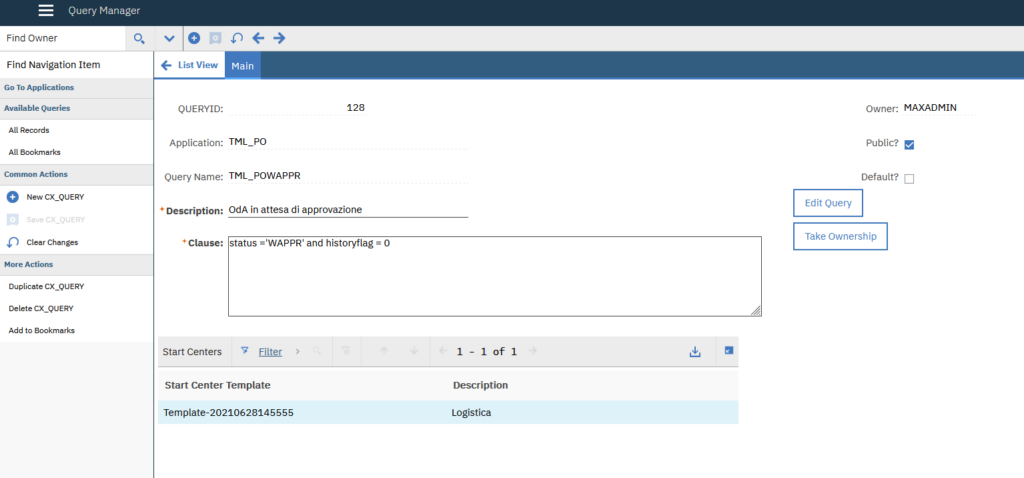
Application
Open Application Designer application and create the following app:
- Application: CX_QUERY
- Description: Query Manager
- Main Object: QUERY
- Key Attribute: QUERYID
- Module: SETUP (Administration module)
- Type: Power App
Save and import this application definition.
Now open again the CX_QUERY application definition and create the following Signature Options:
- CX_QUERYEDIT – Edit Query
- CX_QUERYOWNER – Take Ownership
For both option enable the “This is an action that must be invoked by user in the UI” advanced option.
Open Security Groups application and grant the CX_QUERY application to MAXADMIN group.
If you logout and login back to Maximo you should now see the Query Manager in the Administration menu.
Automation script
Create the following Automation Script:
- Script: CX_QUERY
- Description: Handler for CX_QUERY application
- Language: python
#-------------------------------------------------------------------------------
# Script: CX_QUERY - Handler for CX_QUERY application
#-------------------------------------------------------------------------------

if launchPoint == "CX_QUERYEDIT":
    mbo.setFieldFlag(["DESCRIPTION","CLAUSE","ISPUBLIC"], mbo.READONLY, False)

if launchPoint == "CX_QUERYOWNER":
    mbo.setValue("OWNER", user, mbo.NOACCESSCHECK)
Now create the CX_QUERYEDIT Action Launch Point:
- Launch Point: CX_QUERYEDIT – Edit QUERY
- Launch Point: CX_QUERYEDIT – Edit QUERY
- Object: QUERY
- Script: CX_QUERY
Create the CX_QUERYOWNER Action Launch Point:
- Launch Point: CX_QUERYOWNER – Take ownership QUERY
- Launch Point: CX_QUERYOWNER – Take ownership QUERY
- Object: QUERY
- Script: CX_QUERY
Database Configuration
Open Database Configuration and create the following relationship:
- Object: QUERY
- Relationship: CX_SCTEMPLATE
- Child Object: SCTEMPLATE
- Where Clause: presentation like (‘%’ || :clausename || ‘%’)