Maximo applets and Java security
Maximo applets and Java security
June 9, 2014
Java 6 and 7 have introduced new security features that may create some problems in Maximo/SCCD/TPAE applications that make use of Java applets. Some examples of such applications are Configuration Items, Workflow Designer and Scheduler.
First of all Start Menu > Java> Configure Java > Security > Add the server host to the trusted sites
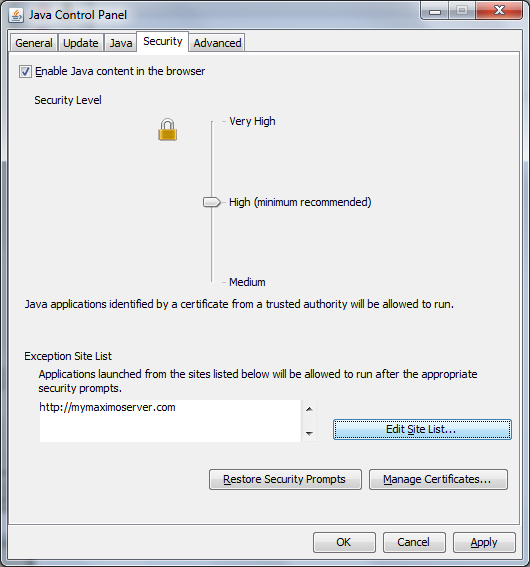
This should be enough to fix Java related issues.
Maximo Scheduler may require an additional configuration to solve the ilogViewerApplet.initProjectDataModel error.

Edit java.policy configuration file (typically located in C:\Program Files (x86)\Java\jre7\lib\security\java.policy) and add the following lines.
grant { permission java.util.PropertyPermission "user.timezone", "write"; };Restart the browser and Java processes and verify everything is working fine.