Create attachments through MIF
Create attachments through MIF
October 22, 2015
Starting from Maximo 7.1.1.6 it is possible to import an attachment (aka doclink) to an objects through MIF. In this example I will show how to add a short text file to an asset record.
First of all you have to create an Object Structure with DOCLINKS as a child object of ASSET.
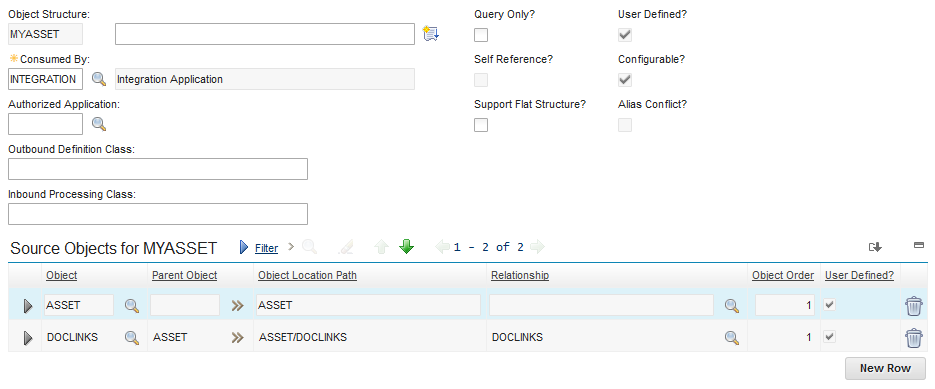
Now you can use HTTP or REST calls to add an attachment to an asset. If you are not familiar with this things I suggest you to take a look at this post.
After server attempts I have managed to find the minumum set of attributes to do the job.
<SyncMYASSET xmlns:xsi="http://www.w3.org/2001/XMLSchema-instance" xmlns="http://www.ibm.com/maximo">
<MYASSETSet>
<ASSET action="AddChange">
<ASSETNUM>13150</ASSETNUM>
<SITEID>BEDFORD</SITEID>
  <DOCLINKS>
    <ADDINFO>1</ADDINFO>
    <URLTYPE>FILE</URLTYPE>
    <DOCTYPE>Attachments</DOCTYPE>
    <DESCRIPTION>test.txt</DESCRIPTION>
    <DOCUMENTDATA>MTIzNA==</DOCUMENTDATA>
  </DOCLINKS>
</ASSET>
</MYASSETSet>
</SyncMYASSET>
Modify the XML above for your case:
- ASSETNUM and SITE uniquely identify the asset record
- DOCTYPE is the folder where you want to put your attachment
- DESCRIPTION is the descriptive name of the file
- DOCUMENTDATA is the binary content of your file encoded with Base64 algorithm