Lookup not working in Advanced Search dialog
Today I faced an interesting problem. My customer asked to be able to search work orders with specific values in one of the custom fields I have added few weeks ago to the Work Order Tracking application. Easy I said. I know I just need to add that custom fields in the ‘searchmore’ dialog of the WOTRACK application. However, when I added the new custom field to the Advanced Search dialog the lookup was displaying an empty list.
After some investigation i have found that the domain assigned to the custom attribute has some bind variables in the List Where Clause.
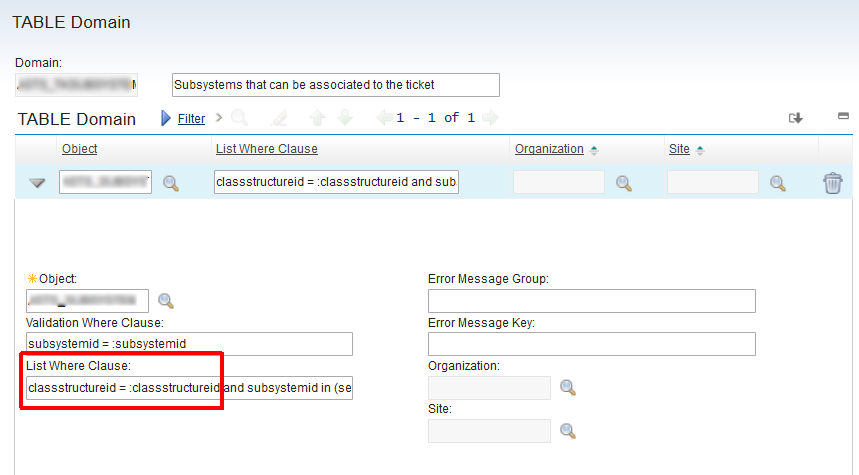
The problem is caused by the fact that Maximo does not know how to bind the :classstructureid variable to display the lookup in the Advanced Search dialog.
An easy solution to this problem is the following Automation script triggered by the Retrieve List event on the custom attribute (SR.SUBSYSTEMID in this example).
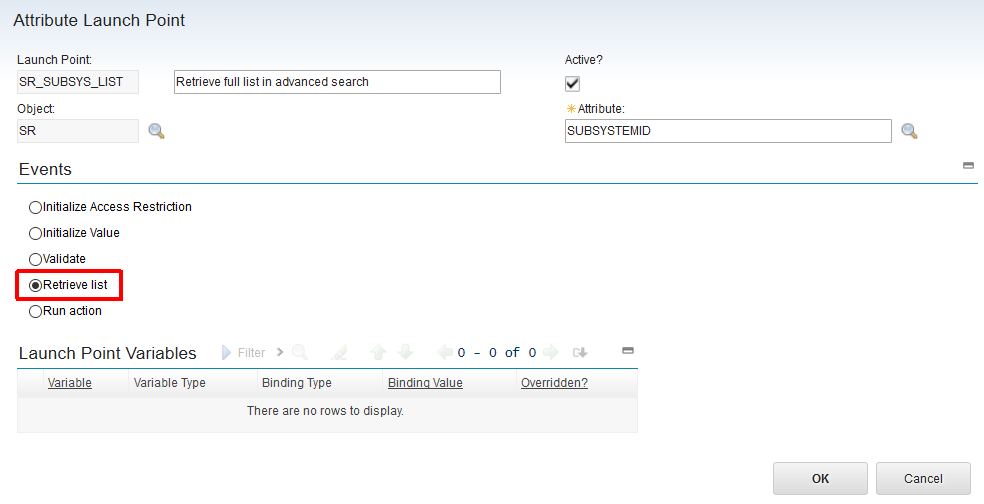
Here is the code snippet.
# Display all values in the Advanced Search dialog
if mbo.isZombie():
    listWhere="1=1"