Maximo escalations demystified (2/3) Performances and the 'repeat' option
In our first Maximo escalations demystified post I have described the general functionality of Escalations. We will now dig into some details that will help you using this powerful feature at its best.
The Repeat flag
When defining an escalation you always have to create an escalation point and then you can assign actions and communications to run. The ‘repeat flag’ have a somewhat strange meaning that is described in the official documentation in this way:
Specifies whether to continue monitoring for records that meet this escalation point’s criteria after the first instance is found. If selected, the escalation will continue to trigger actions and/or notifications associated with this escalation point when the conditions are met. If the check box is cleared (the default), the escalation only runs once when the conditions are met.
This flag has some serious implications that I will explain hereafter.
Common mistakes
Escalations are a great tool in the hand of the Maximo specialist but it’s not rare to see misuse of it. I will share some examples here.
- Escalations scheduled to run each minute (or even more frequently) - This particularly dangerous for system performances especially if the query is running on large tables like WORKORDER, TICKET, WFASSIGNMENT, etc. Always ask yourself, can I reduce the frequency? If the answer is no, you are probably using the wrong tool. Think about using an automation script instead. Do you know Maximo 7.6 allows to run a script with ‘After Save’ or ‘After Commit’ trigger?
- Badly designed where condition - I’m very cynical here. Most of the Maximo specialists have poor SQL skills. This is probably because they started their career as developers (programmers). A badly designed SQL where cause can have execution time of more than a minute. In one of my engagements I have reduced the the execution time of the escalation from more than 2 minutes to less than 1 second by simply adding the right index to the WORKORDER table and rewriting an inner clause.
- Wrong selection of records - Inexperienced consultants relies too much on the ‘Repeat’ flag on the escalation point to exclude records that shouldn’t be processed. This means that the condition does not filter out useless records. Se the example below.
Lets pretend you want to close automatically WORKORDERS if the status has not been changed for more that 60 days.
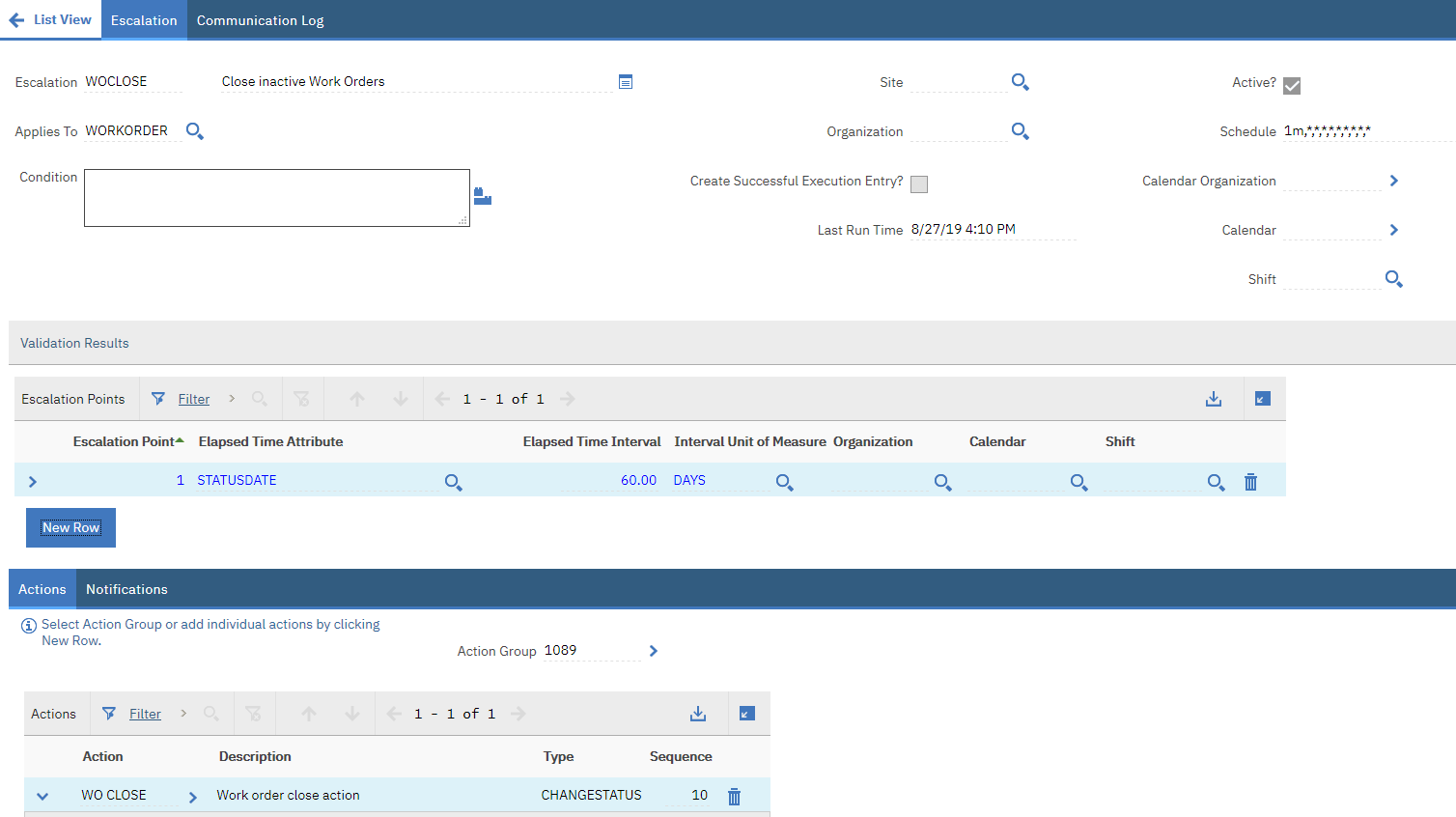
The following escalation contains all the errors mentioned above.
- Escalation: Close inactive Work Orders
- Applies to: WORKORDER
- Frequency: each minute
- Condition: statusdate>sysdate-60
- Escalation Point
- Elapsed Time Attribute: STATUSDATE
- Elapsed Time Interval: 60
- Unit of Measure: DAYS
- Repeat: False
- Action
- WO CLOSE
Error 1 - Schedule
Why do you need to run the escalation each minute?
I’m sure you can perfectly run the escalation each day during night hours without any considerable side effect.
Error 2 - Poor SQL
The escalation will translate to the following SQL clause.
select * from workorder
where (statusdate <= { ts '2019-06-28 16:04:00.796' })
  and not exists (select escrepeattrack.ownerid from escrepeattrack where escrepeattrack.ownerid = workorderid and objectname= 'WORKORDER' and refpointid=228 and escalation= 'WOCLOSE')
Each time the escalation runs Maximo will have to find records in the workorder table where STATUSDATE is more that a specific timestamp. Now if you look at WORKORDER table indexes you will find out that there is no index defined on the STATUSDATE field. This means that the database will do a full table scan on the WORKORDER table that can have millions of records.
Adding an index on the STATUSDATE could improve performance. However this is not the case because, after years of operations’, 99% of the records will have an older status date so there is no meaning in adding the index because it will always be convenient for the database to perform a full scan.
In this case we have to rethink the whole thing. Let’s see the third error.
Error 3 - Wrong selection of records
Why do you have to include work orders that are already closed?
The escalation relies on the ‘repeat flag’ set to false to avoid that Maximo tries to close the same record twice but this is not the most efficient approach.
Solution
- Escalation: Close inactive Work Orders
- Applies to: WORKORDER
- Frequency: every day at 2 AM
- Condition: status!=‘CLOSE’ and historyflag=0 and statusdate>sysdate-60
- Escalation Point
- Repeat: True
- Action
- WO CLOSE
This will be translated with the following query.
select * from workorder
where (status!='CLOSE' and  historyflag=0 and statusdate>sysdate-60)
This will have the following benefits:
- Schedule is now more relaxed and is running in low-workload time.
- The is no join with the ESPREPEATTRACK because the ‘repeat flag’ is selected. Once the escalation runs on a record it will set the status to CLOSE so it will be excluded in the next run without having to look in the ESPREPEATTRACK table.
- The condition on STATUS and HISTORYFLAG will help per database query optimizer to use the right database index (there are several indexes on those fields).
I hope this will help you improving escalation’s design for your customers.
Continues: Maximo escalations demystified (3/3) Monitoring execution